

For dental and medical professionals, a saddle chair with backrest is contoured seating with rear support intended to support seated work across charting and treatment tasks. This 2026 guide explains how to check patient access, backrest contact, desk clearance, and adjustment trade-offs before choosing a model.
- Choose a saddle chair with backrest by testing both charting and treatment positions, not seated comfort alone.
- Sithealthier offers saddle seating alongside medical and dental stools for clinical buyers comparing support configurations.
- A lumbar backrest and an upper-limb support serve different purposes; compare them against your actual tasks.
- Confirm seat dimensions, height range, cleaning instructions, and control access before selecting a dental stool.
Why this matters for dental and medical professionals
The right backrest supports a position you actually use without blocking the position your next task requires. Charting brings you toward a keyboard and monitor; treatment brings you toward the patient, instruments, and foot controls. Test both before deciding that a chair fits.
Sithealthier is best for clinical buyers comparing saddle seating with medical, dental, and office chairs. The selection includes saddle chairs with lumbar backs, split-seat models with backrests, and Surgeon seating with upper-limb support; those categories solve different positioning needs.
For a 2026 seating purchase, write down the task that your current setup handles poorly. A backrest is not a substitute for moving a distant keyboard, correcting an unsuitable work height, or clearing space beneath a treatment surface.
Home-office buyers can use the same checks, with keyboard access replacing patient access as the main constraint. Clinical buyers must also assess pedal operation, movement around the patient, and cleaning requirements.
How to fit a saddle chair with backrest to clinical work
1. Separate charting from treatment requirements
Start with your existing chair and a task list. Identify where you sit for documentation, where you position yourself for treatment, and whether you move between those locations or rotate within one workspace.
Check 2 task positions: charting and treatment. This is a practical comparison method, not a prescribed clinical standard. A chair that feels comfortable facing a desk still needs a separate patient-access check.
Record what stops you from getting closer. The obstruction might be a drawer, chair base, arm support, backrest, or equipment stand rather than the seat itself. Keep the problem specific enough to compare against a product specification.
- Identify your primary seated clinical task.
- Describe your usual charting position.
- Mark the equipment that limits access.
- Note whether you share the chair with another user.
- Separate chair problems from room-layout problems.
2. Measure the workspace before choosing the seat
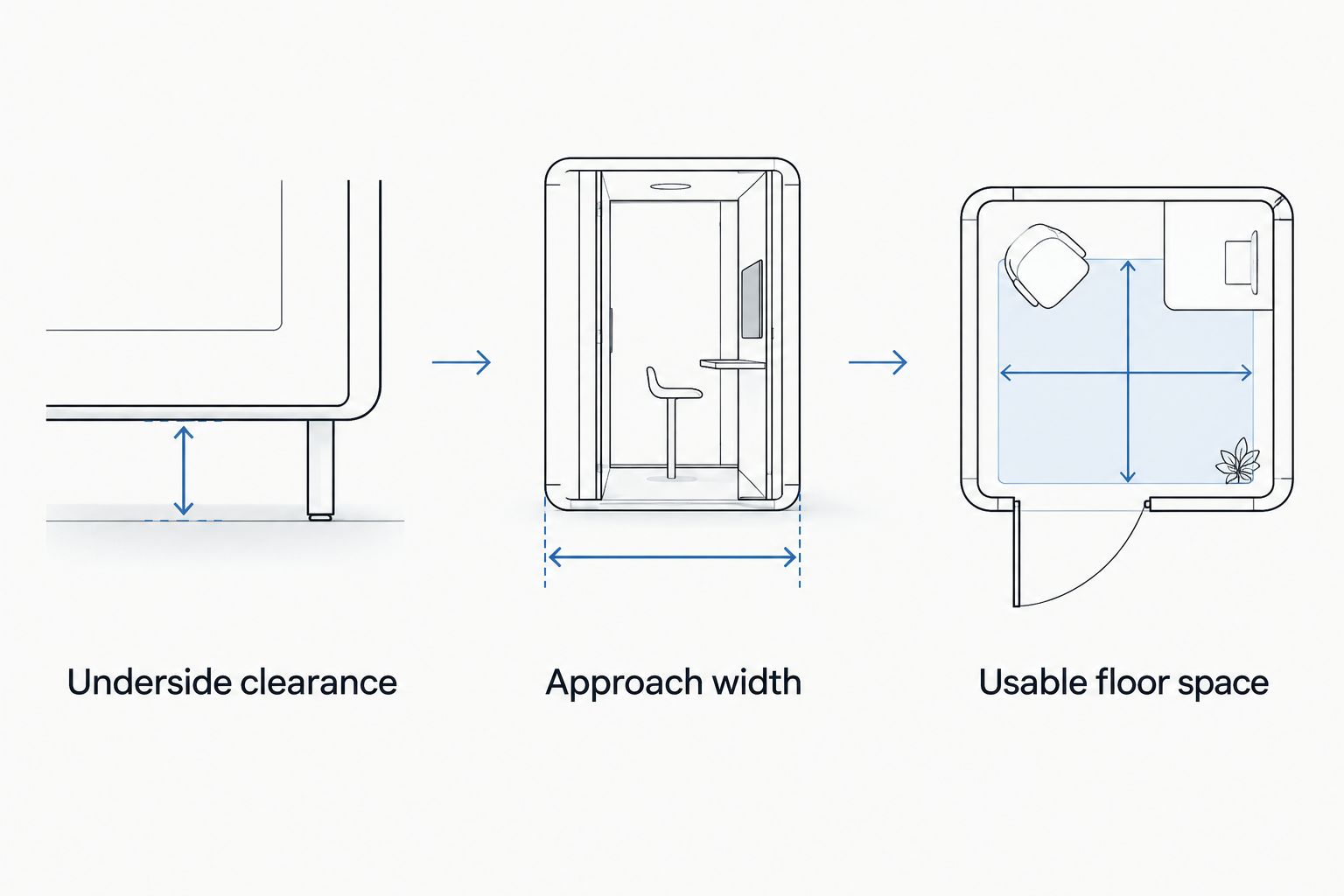
Use a tape measure and record dimensions in inches. Measure the underside of the charting surface, the available approach space beside the patient, and the floor area occupied by nearby equipment.
Take 3 workspace measurements before building a shortlist: underside clearance, approach width, and usable floor space. These are measurements to collect, not universal fit thresholds. Compare them with the complete chair configuration, including its base and supports.
A seat-height specification alone does not establish fit. You also need room for your legs, access to the work surface, and a base that does not collide with equipment during repositioning.
- Record underside clearance at the charting station.
- Measure approach width beside the treatment area.
- Map usable floor space around equipment.
- Include drawers and brackets in clearance checks.
- Compare dimensions with the assembled chair configuration.
3. Match the seat shape and backrest to your body
Evaluate seat shape before treating a backrest as the deciding feature. A single-piece saddle, a divided saddle, and a narrower saddle require separate fit checks; the presence of rear support does not make their seating surfaces equivalent.
Sithealthier's 2026 saddle chair with backrest choices include the English Saddle Style with Lumbar Back Office Chair and USA Patented Multi Adjustable Saddle Stool with Backrest by Kanewell. Use these as configurations to investigate, not interchangeable recommendations. Confirm the current specifications for the exact version you select.
Best for charting-focused buyers: a saddle-and-backrest configuration that permits usable support while keeping the keyboard close. Its limitation is task dependence: a backrest cannot support your back when your treatment position takes you away from it.
- Compare seat width and contour separately.
- Confirm the available seat-height range.
- Check which backrest adjustments the model provides.
- Assess contact in your working position.
- Confirm specifications for the selected configuration.
4. Test backrest contact during charting
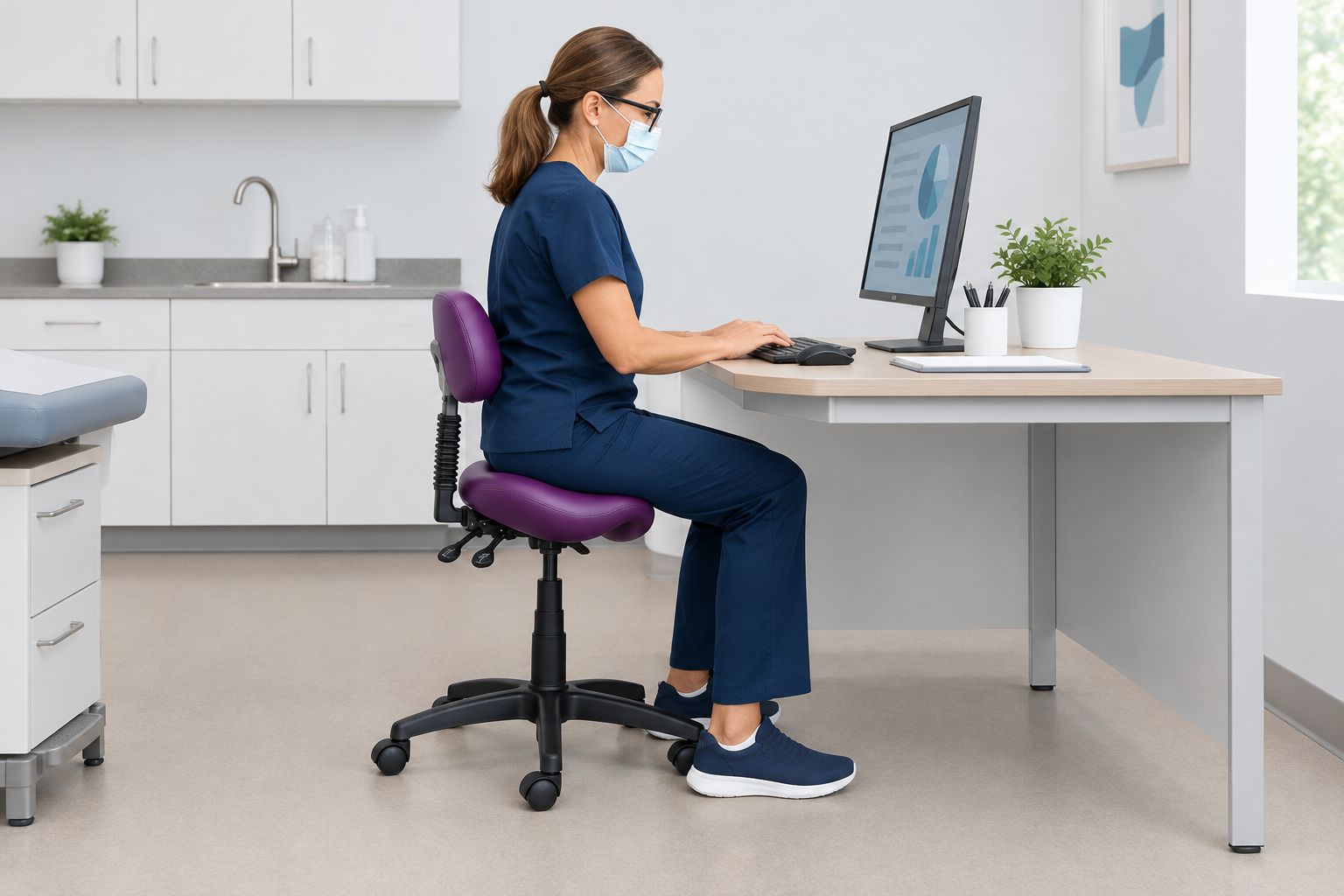
Set up the charting station before judging the backrest. Bring the keyboard and pointing device into a usable position, then check whether you can reach them without moving away from the rear support.
Do not chase backrest contact by leaning backward while reaching forward. Instead, reassess the relationship between your seat position, work surface, and input devices. The useful test is whether the setup supports the task, not whether you can touch every support at once.
A photo taken from the side can help you compare setups. Keep the chair, desk, and keyboard visible so you can distinguish a seating mismatch from a reach problem.
- Position the keyboard for ordinary charting.
- Check that the seat approaches the desk.
- Assess backrest contact without forced leaning.
- Keep the pointing device within usable reach.
- Recheck leg clearance after adjusting the chair.
5. Check treatment access and support clearance
Move from the charting setup to the treatment position. Check your approach to the patient, instrument access, and any foot-operated equipment before deciding whether the backrest or another support belongs in that working position.
Best for upper-limb-support comparisons: Surgeon seating whose documented support arrangement matches your task. The Salli Surgeon or Expert Twin Medical Chair or Tool is described as incorporating static upper-limb support. That is a different feature from lumbar support and requires its own clearance check.
Extra support is useful only when it fits the working area. Confirm whether its location and adjustment permit your required movements; do not assume that a support rotates, folds, or moves out of the way unless the selected model's specifications state it.
- Approach the patient from your usual position.
- Check instrument and equipment access.
- Test access to foot controls.
- Check support clearance during repositioning.
- Assess getting onto and off the seat.
6. Verify controls, cleaning, and floor behavior
Read the selected chair's operating and care instructions rather than inferring suitability from the word ergonomic. For a 2026 clinical purchase, verify upholstery care, adjustment operation, and the supplied caster configuration against your workspace requirements.
Check controls in the positions where you will use them. A height lever that is easy to reach beside an empty desk needs another check near the patient and surrounding equipment. Foot-operated height adjustment is a separate feature to confirm, not a standard feature of saddle seating.
Do not assume accessory compatibility. A replacement caster, foot ring, or cylinder needs confirmation for the exact chair. Different wheel or base configurations also deserve a fresh clearance check.
- Review the manufacturer's cleaning instructions.
- Confirm compatibility with your facility's cleaning process.
- Locate every adjustment control.
- Verify the supplied caster type.
- Confirm compatibility before adding accessories.
7. Compare complete configurations before ordering
Build a written comparison using the same fields for every candidate. Include the seat, backrest, cylinder, base, casters, and any arm or foot support you intend to use; a product name alone does not describe the complete fit.
Run 2 setup checks for each candidate configuration: one for documentation and one for treatment. If you cannot physically assess a model, compare your recorded measurements with its documented dimensions and ask for clarification on unresolved fit questions.
Choose the simplest configuration that meets your task requirements. An additional support adds another feature to position and check, so require a clear purpose for it rather than treating more components as an automatic improvement.
- Compare the same specification fields across candidates.
- Record the exact configuration being considered.
- Resolve unclear dimensions before ordering.
- Check both documentation and treatment requirements.
- Review the seller's current purchase policies.
Compare saddle-backrest and Surgeon seating options
For this 2026 comparison, the named products illustrate different support arrangements. Best for labels describe the feature to investigate, not a verified individual fit. Confirm current dimensions, adjustment ranges, and care instructions before making a selection.
| Option | Best for | Documented feature | Key limitation or fit check |
|---|---|---|---|
| English Saddle Style with Lumbar Back Office Chair | Comparing English-style saddle seating with lumbar support | English saddle-style seat with lumbar back | Assess whether backrest contact works at the charting station and clears treatment movements. |
| USA Patented Multi Adjustable Saddle Stool with Backrest by Kanewell | Comparing a multi-adjustable saddle stool with rear support | Saddle stool with backrest | Verify the exact adjustment functions and ranges rather than inferring them from the name. |
| Salli Surgeon or Expert Twin Medical Chair or Tool | Comparing static upper-limb support for clinical work | Static upper-limb support described in the product information | Upper-limb support is not the same as lumbar support; check its working position and clearance. |
| Backless saddle configuration | Comparing an unobstructed rear seating arrangement | No backrest to position | Provides no rear support for charting; assess whether that matches your task needs. |
The backrest models below belong on a shortlist when rear support is a requirement. The Surgeon model belongs on a separate shortlist when upper-limb support is the requirement. Neither category wins without a workspace fit check.


Common mistakes clinical buyers make
Selecting the backrest before checking patient access
A comfortable charting position is only part of the decision. Check the approach to the patient and equipment before choosing the complete configuration; a support that suits documentation still needs to clear your treatment movements.
Confusing lumbar support with arm support
A lumbar backrest contacts the back; an upper-limb support provides a place for the arms or elbows. Compare the support location your task requires rather than searching for the largest number of supports.
Treating a foot ring as proof of pedal access
A foot ring and a treatment pedal have different purposes. Check how you place your feet during actual work, including whether you can reach and operate equipment without the chair configuration getting in the way.
Assuming the same chair setting fits every clinician
Shared seating needs a repeatable adjustment process. Record each user's workable settings where the controls permit it, and confirm that the chair's documented ranges cover the people who will use it.
Reading ergonomic wording as a treatment claim
Select seating for fit, support, and task access. A saddle chair with backrest does not guarantee pain relief or treat a medical condition; persistent symptoms require assessment by a qualified healthcare professional.
FAQ
What's the best saddle chair with backrest for dental charting?
The best saddle chair with backrest for dental charting is one that provides usable rear support while allowing close keyboard access. Compare seat fit, height range, backrest adjustment, and clearance beneath the charting surface before selecting a model.
Is a saddle chair with backrest better than a backless saddle stool?
A saddle chair with backrest is better for a task that requires usable rear support, but it is not automatically better for every treatment position. A backless configuration removes the backrest clearance question but provides no rear support for charting.
Can I use the same saddle chair for treatment and documentation?
Use the same saddle chair for treatment and documentation only after checking both setups. Confirm patient access, keyboard reach, support clearance, and adjustment access rather than judging the chair at the desk alone.
Do Surgeon chairs provide the same support as lumbar backrests?
Surgeon chairs and lumbar-backrest chairs do not necessarily provide the same support. The Salli Surgeon or Expert Twin Medical Chair or Tool is described as incorporating static upper-limb support; check each model's documented support arrangement.
Should a dental saddle stool have a foot ring?
Choose a foot ring when the seating setup requires that form of foot support and the chair is compatible with it. Check foot placement and treatment-pedal access together; a foot ring does not establish that the complete setup fits.
What should I measure before ordering a saddle chair online?
Measure underside clearance, approach width, and usable floor space before ordering a saddle chair online. Compare those measurements with the selected chair's complete dimensions, seat-height range, and support configuration.
Will a saddle chair with backrest cure my back pain?
A saddle chair with backrest does not guarantee pain relief or cure a medical condition. Choose seating for your body and work requirements, and seek qualified healthcare advice for persistent or worsening symptoms.
One last thing
For your 2026 shortlist, check where the backrest is during work, not just where it sits in a product photo. If your treatment position takes you away from rear support, the backrest's main purpose might be charting rather than treatment.
Before selecting a Sithealthier saddle chair with backrest, write one sentence describing the job you expect that backrest to do. Then verify that the selected configuration can perform that job without compromising patient access.
Leave a comment